Practice typing
with educational games
- Playful typing practice
- Increase your typing speed
Use these free educational typing games to add some play to your keyboard practice. Choose a game and practice finding keys, typing words correctly, and maintaining accuracy under time pressure while you play.
Rebellious Robot
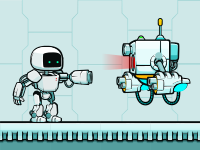
Guide a rebellious robot through platform levels by typing whole words. Correct words help the robot jump, shoot enemy bots, and collect crystals, so this typing game is useful when you want word practice with quick reactions and a clear arcade goal.
Sheep Rescue
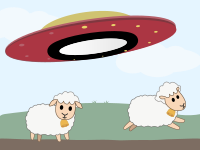
Rescue sheep from aliens by typing the letters and numbers shown on them. Sheep Rescue is a good first game if you want to train single-key recognition before moving into longer words.
Word-jumper
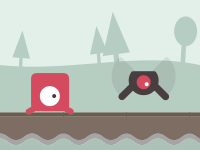
Type full words to move through changing platform levels and defeat enemies. Word-jumper is best when you already know the keyboard layout and want to build faster word typing without repeating the same level every time.

Star Words
Type the words written on stars and collect points before the star timers run out. Star Words is calmer than the platform games, but it still trains speed, accuracy, and attention because you need to notice which word should be typed first.
Learn with typing games
How to use the typing games
Start by choosing a game that matches the kind of practice you want. Use Sheep Rescue for letters and numbers, Star Words for timed word practice, and Word-jumper or Rebellious Robot when you want to type whole words in a more arcade-style game.
Each game reacts quickly to what you type. A correct key or word lets you complete an action. Mistakes waste time and, depending on the game, can cost points, a life, or the whole round. These educational typing games suit kids as well as adults who want a short typing practice session.
Use the score to follow your progress, but also pay attention to how you type. Good practice means typing carefully and avoiding random key presses just to stay in the game. If you notice that you are guessing, slow down for a moment and concentrate on typing accurately.
Try Sheep Rescue. You type single letters and numbers, so it is easy to notice which keys still slow you down.
Try Rebellious Robot or Word-jumper. Correctly typed words control the character's actions and help you overcome obstacles.
Try Star Words. Each star has its own timer, so you need to decide which word to type first.
Use a harder difficulty only when you can play without guessing keys or losing accuracy.
Typing games for kids
Typing games for kids are useful because they turn abstract keyboard practice into clear tasks: save the sheep, collect stars, guide the character, or finish the level. A child gets a specific reason to find the right key instead of only copying a row of letters.
Failing a level can be frustrating, especially when a child has to start again. Give them time to try again without rushing. Patience matters in touch typing too: good typing habits develop through repeated practice.
Start younger learners with short rounds. One useful rule is to end the session while the child still wants another try. If they become tired and start guessing keys, take a break; random key presses do not provide good typing practice. Keep the game enjoyable by stopping before the child becomes bored or exhausted, and let them return for another round when they are ready.
Sheep Rescue is usually the easiest game to try first because it focuses on single characters. When the keyboard feels more familiar, whole-word typing games such as Star Words, Word-jumper, or Rebellious Robot can help with speed, attention, and reading short words quickly.
Parents and teachers should watch for simple, visible habits: the child should look mostly at the screen instead of the keyboard, use all fingers, and avoid pressing random keys. Winning is nice, but following good typing technique matters more. If games make the child type incorrectly, the child should spend more time on typing lessons.
Can typing games teach touch typing?
Typing games can help you practice touch typing, but they should not be the only way you learn. They are good for repeating keys and words in a more playful setting, especially after you already know where your fingers should go.
Some focused keyboard exercises may be less interesting than games, but they are still needed because they teach correct finger placement step by step. Typing games make practice more engaging, but they do not automatically fix incorrect finger movements.
If you are a beginner, focus on using the correct fingers and typing accurately before chasing high speed scores. Fast typing with incorrect finger movements can make bad habits harder to change when you move on to longer texts.
Scores, levels, and game rules
Scores and levels work differently in each typing game, so it is better to understand the rule of the game you are playing instead of using one rule for all games.
Rebellious Robot
In Rebellious Robot, typed words control actions such as jumping, shooting, punching, flying onto platforms, and collecting crystals. You can collect bonus points and extra lives, and your result is saved after the game ends, when the robot loses all its lives.
Word-jumper
In Word-jumper, you type the words that appear in the jumper's path. If an obstacle reaches the jumper before you type the word, the game ends. The lands change after several completed levels, so the game keeps changing visually as you progress.
Sheep Rescue
In Sheep Rescue, you type the letters and numbers shown on sheep. Correct characters give you points. Characters that are not shown on any sheep cost points and make the sheep move faster and appear more frequently. The game ends when too many sheep have been abducted. Destroying the alien spaceship completes the level and lets you move to the next one.
Star Words
In Star Words, every star has a word and its own timer. Longer words give more points, but pay attention to stars whose timers are about to run out. If a star explodes, the game ends. If the level timer reaches zero without an explosion, you move to the next level.
Choosing the right typing game
The best typing game is not always the one with the most action. The best one lets you relax a little while also helping you practice the parts that are still difficult for you.
Choose Sheep Rescue when you still need to find letters and numbers faster. Choose Star Words when you want a calmer game that still checks your attention. Choose Word-jumper or Rebellious Robot when you want to practice full-word typing in a faster game.
A small tip: if you cannot reach later levels but really want to, step away from the game for a while and practice the basics. Use the typing course to work on correct finger placement with the virtual keyboard, then use texts to practice longer typing without game pressure.
Using games with other typing practice
Games are best as extra practice, not as the whole typing course. They help you stay engaged, but they do not show finger placement as carefully as structured exercises do.
For a full typing routine, use the typing course to practice correct finger placement with the virtual keyboard, the typing test to check your speed, and texts to practice longer real sentences.
If you are just starting and only play games, you may quickly notice that your typing speed improves. The problem is that without proper technique and using the correct fingers, it is easy to strengthen bad habits. When you combine typing games with typing lessons and text practice, you get both motivation and a stronger technical foundation.
Frequently asked questions (FAQ)
Do typing games have educational value?
Yes. AgileFingers typing games have educational value because progress in each game depends on typing letters, numbers, or words correctly. They train key recognition, accuracy, speed, and typing confidence, while making the learning process more enjoyable.
Which typing game should a beginner start with?
Sheep Rescue is a good first choice because it focuses on single letters and numbers. It helps you recognize keys before you move into games that require typing full words.
Are typing games only for kids?
No. Typing games are useful for both kids and adults. Kids often like the goals and characters, while adults can use the same games for short typing practice between regular exercises.
Can I use typing games instead of typing lessons?
Typing games are useful as extra practice, but they should not fully replace structured learning if you are new to touch typing. Let typing games be a pleasant break in keyboard practice, and use typing lessons and texts to practice correct finger placement more carefully.
How long should I play typing games?
Short sessions are usually best. Play a few rounds, but do not use games as a full replacement for normal training. It is especially important to use typing lessons and text practice, because they help you follow correct finger placement with the virtual keyboard and build better touch typing habits.