Building touch typing habits
Your usual typing method may get the job done, even if you still have to look down at the keyboard and press keys with the wrong fingers. Learning touch typing means learning a scheme of finger movements, while daily work still needs to be done. Can this slow down your work? How do you keep returning to typing practice once the early enthusiasm fades, and how much time should you expect learning to take?
Key takeaways
- Make a daily appointment: Practice after a particular meal break or at a regular time that fits your schedule.
- Start with 10-15 minutes: Keep typing practice manageable enough to continue beyond the first week.
- Use the correct fingers: Work on accurate finger placement and the key combinations that interrupt your typing.
- Track effort and results: Check your practice time alongside accuracy, speed, and dependence on the keyboard guide.
Put typing practice into your daily schedule
Research on daily routines offers useful lessons about keeping a practice schedule. In Habit formation following routine-based versus time-based cue planning (2021), 192 adults chose a nutrition behavior to repeat for 12 weeks. One group linked it to an existing daily routine, while the other chose a specific time. Researchers analyzed daily reports from 135 participants who remained in the study.
In both groups, the action became more automatic over time, with neither scheduling method showing a clear advantage. People who stuck to their plans saw greater improvements, especially at the beginning. However, progress was not always steady. Some people found the action easier at first but needed more effort later. This shows that even when something starts to feel like a habit, keeping it up still requires consistency.
Those findings can help you plan typing practice, while keeping in mind that the research concerned nutrition habits. Reserve a short daily appointment: 15 minutes after you have a break for your meal, for example. If your breaks vary, choose a fixed time instead and put it in your calendar. Keep the keyboard ready and bookmark the exercise page in your web browser so that you can begin when the planned time arrives.
How much time should you spend practicing each day?
It is a good idea to start with 10-15 minutes of touch typing practice daily. This is practical advice for building a routine, not a scientifically established optimum. Choose an amount you can still face after the first week. The goal is to avoid making typing practice so long or repetitive that you become bored and stop returning.
Give that time a simple purpose: work on the keys you are learning, then try them in a passage when you are ready. When the planned time is up, finish and get on with your day. You can practice longer if you enjoy it and remain comfortable, with breaks between exercises. On a busy day, one short typing exercise is better than no keyboard practice at all.
How long does it take to learn touch typing?
It is hard to find reliable research that predicts how long an individual needs to learn the whole keyboard through 10-15 minutes of daily practice. Your starting technique, regularity, accuracy, and learning goal all matter. Learning key positions, typing a whole passage without looking, and reaching a particular speed are different milestones. A promise that everyone will master touch typing in a fixed number of days would go beyond the evidence.
What typing-training research shows
In Typing Fluencies of 12-13-Year-Old Students with Dyslexia and Peers with Typical Development (2024), 42 Slovenian school students practiced touch typing on QWERTZ computer keyboards during a two-week course. Half had dyslexia and associated writing difficulties. The course taught eight middle-row letters through 40-50 minutes of practice per weekday, divided into short exercises.
Both groups improved on the trained keys. For example, in the first stage, the group without dyslexia averaged about 112 correct characters per minute after 30 minutes of practice and 162 after 90 minutes. That stage used just four letters. These results show measurable progress on a limited task; they are not whole-keyboard typing speeds or a forecast for someone practicing 10-15 minutes a day. The authors also noted that research on the entire training process was needed.
How to judge your own improvement
Use your first typing exercises as a starting point, then compare similar exercises about once a week. Look for fewer repeated mistakes, more familiar reaches, and less need to check the keyboard guide. If your speed rises while accuracy stays steady, that is useful progress. If a new lesson adds unfamiliar keys, allow yourself to slow down while learning them.
There is no reliable weekly speed gain to promise every learner. Someone changing to a fast, self-taught method may initially type more slowly while concentrating on new finger movements. Compare the technique you are learning with its own earlier results. Over several weeks, those results can help you decide what needs more practice and whether your schedule is realistic.
Build corect finger movements
Practicing regularly helps build a habit, but how you practice matters too. As you repeat the same finger movements, they gradually become more automatic, requiring less conscious effort. This is often called "muscle memory," although it is your nervous system that learns and remembers these movements, not your muscles. The article on touch typing and muscle memory explains how this process works in more detail.
In How We Type: Movement Strategies and Performance in Everyday Typing (2016), researchers tracked the hands and gaze of 30 people copying text using physical computer keyboards. Faster typing was associated with consistent finger choices, preparation for upcoming keys, and less movement of the whole hand. This was an observational study, so it identifies useful features of skilled typing rather than proving a particular training method.
For a learner, a touch typing course provides a clear pattern to rehearse: use the assigned finger, learn the reach, and use the home keys to find your position again. If a key keeps causing trouble, slow down and check the on-screen guide before trying the movement again. Practice it within a short sequence, too, because reaching a key from the preceding letter can feel different from pressing it on its own.
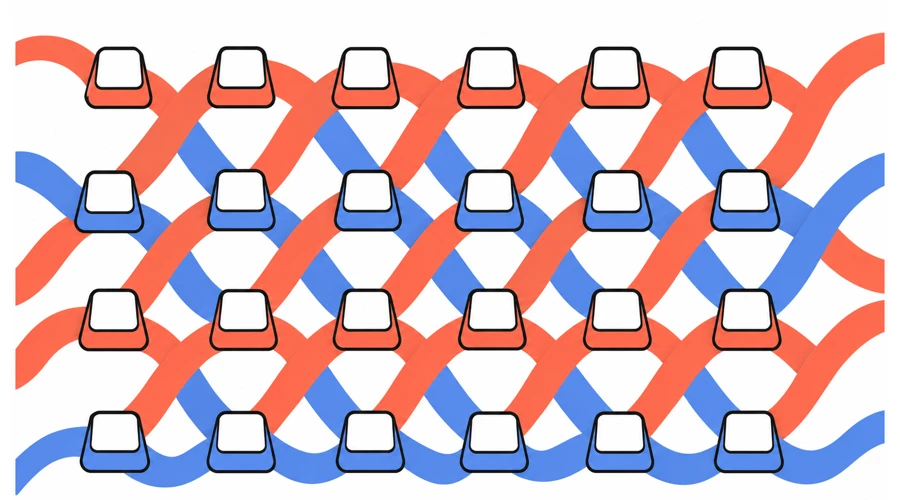
Touch typing is connected with muscle memory; it requires practice and takes time to learn. We can make some comparisons that are not so obvious. Let's compare it to karate. Practicing a controlled movement in this martial art gives you something to refine on the next repetition. In ballroom dancing, a familiar step also has to fit into the sequence around it. The comparison is about how you practice, not equal learning times or physical demands. At the keyboard, repeat the intended movement at a manageable pace, then work toward using it smoothly in a sentence.
Using the same fingers for the same keys helps build muscle memory, but you don't need to follow a finger placement diagram perfectly from the start. The previously discussed study How We Type found that some people who taught themselves to type were just as fast as trained touch typists. Standard finger placement is a good starting point, but the main goal is to type accurately and comfortably without looking at the keyboard. Touch typing provides a consistent pattern for finger movements and distributes the work across all your fingers. Although some fingers do more work than others, this approach helps avoid relying too heavily on just a few fingers and may reduce unnecessary strain.
Practice on your everyday keyboard and layout
Use the keyboard and layout you normally use at work or school when possible. That lets you practice the same reaches you will need during the day. A standard laptop or desktop keyboard is a suitable starting point; learning touch typing does not require a special keyboard. If you use AgileFingers, which is a great tool to learn touch typing, make sure the keyboard layout you've selected matches your computer's input settings and the characters printed on your keys.
Start with your usual standard layout. Choose an unfamiliar custom layout only if you have a clear reason and intend to keep using it. Learning it alongside the layout you need at work or school adds another set of key positions to learn and switch between. Keeping your setup familiar leaves you free to concentrate on finger placement and accurate typing.
A repeatable AgileFingers practice routine
Keep the structure of your typing practice familiar while changing the material as you learn. The following routine gives each visit a purpose without requiring a new plan every day.
Begin with a focused lesson
Use the AgileFingers typing lessons to practice a small set of keys. If you are starting, work through the lessons in order and follow the virtual keyboard and hands. If you already know the layout, choose a lesson that includes a troublesome reach. Aim to press the intended keys accurately before increasing your pace; repeated guessing gives you little useful feedback about the movement.
Practice typing full texts
Once you can use the keys in a passage, try full-text typing practice. Sentences ask you to connect movements and handle punctuation and capitals. AgileFingers offers many texts, so choose something that interests you and change passages to keep typing practice varied. Choose a manageable exercise length or use time mode. If you are still learning a small part of the keyboard, stay with lessons until a text is a useful challenge rather than a search for nearly every key.
Finish with one useful observation
Check the exercise result and decide what to work on next time. "I still pause before capital letters" gives you a clearer next step than "I need to get faster." You can also notice progress that a speed score misses: fewer looks down, less reliance on the virtual hands, or a difficult key becoming easier to reach. Pay attention to what you find difficult and focus on improving those skills in your next practice session.
Track today's practice time and your results
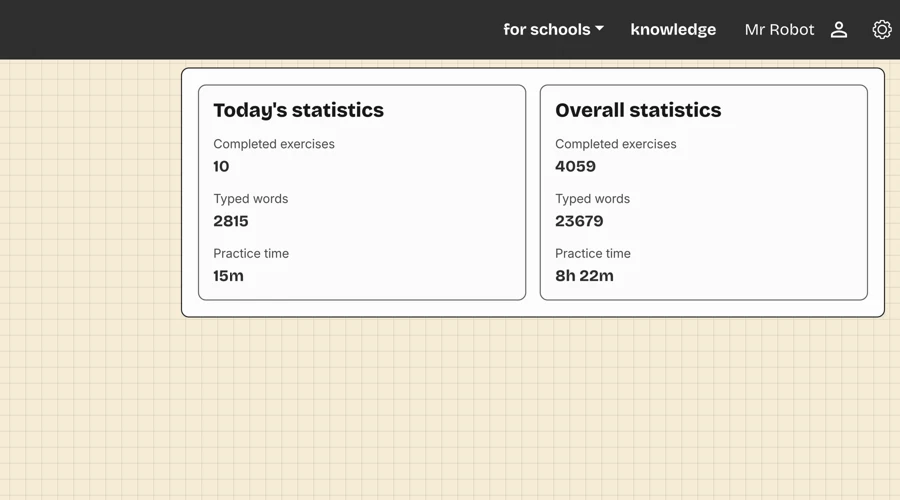
AgileFingers records exercise time, so you can check how much typing practice you have done today. Signed-in users can open the account menu and choose progress. The panel shows today's statistics, including completed exercises, typed words or characters, and practice time, alongside overall totals. The daily practice-time total combines recorded lessons and text exercises; it is not the time you have had the website open.
Use that total to check whether your routine fits your day. Keep effort and performance separate: practice time tells you how much recorded practice you have done, while speed and accuracy show how well you performed. The lesson and text lists show recent speed and accuracy results. Look at your results over several practice sessions to get a better sense of your progress, rather than judging your improvement by a single exercise.
Make regular practice easier to maintain
If you miss a day of typing practice, simply continue the next day. The previously discussed study comparing fixed practice times with daily routines found that people who practiced more consistently developed stronger habits. If you often skip your exercises, try practicing at a different time of day or making your sessions shorter. It is better to have a realistic plan you can follow than one you keep putting off. If you can't practice at your usual time, try to fit in a short typing practice session later in the day. Even a few minutes of practice are better than skipping the day entirely.
Pay attention to your comfort, too. Take breaks between exercises, change your sitting position occasionally, and stop if your hands feel uncomfortable. When you are tired and find it difficult to concentrate, a shorter session may be more useful than pushing yourself to finish. There is no need to make up for missed practice by spending extra time at the keyboard the next day. Remember that it is up to you how much you type and how often. Don't blame yourself for all your inconsistencies. Having positive associations with learning is a key to learning effectively.
People also ask
Can I keep using my old typing method at work?
If your main difficulty is looking at the keyboard, do not force yourself to stop doing it overnight at work. Your income may depend on completing tasks promptly, and learning a new technique can temporarily slow you down. Keep your focused typing practice separate from urgent work, then try the new technique in short messages when you have time.
Try to use the intended fingers even when you need to glance at the keys. Give correct finger placement priority: you can reduce those glances gradually as the movements become familiar. Repeatedly reaching with a different finger builds another movement pattern that you would later need to replace. Learning the finger positions gives you a foundation for looking down less often.
Should I practice the same text every day?
Changing texts can help keep typing practice interesting. Repeating the same passage every day can become boring, and knowing what comes next can influence your score. AgileFingers has many texts to choose from, so find a different passage that interests you. You can briefly return to a difficult sequence when it needs attention without making that passage your entire daily routine.
Conclusions
Reserve 10-15 minutes for typing practice at a regular time, use your everyday keyboard, and give your fingers a clear pattern to learn. AgileFingers, with its virtual hands, can be a great help. Keep the material varied and review your accuracy and speed over several practice days. A routine you can maintain gives you time to improve without depending on a promised finishing date. If you adapt your touch typing practice to your time constraints and practice regularly, you will surely learn to type faster and more accurately without looking at the keyboard.