Free online touch typing practice
Type faster without looking at the keyboard
For students, teachers,
and anyone who wants to type faster.
- Learn through play
- No login required
- School friendly
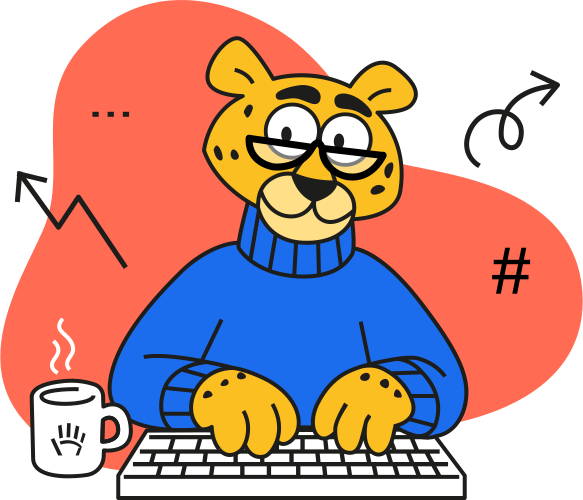
AgileFingers offers several ways to practice touch typing: start with the course to learn the basics, practice longer texts, play typing games, and check your level when you feel like a challenge.
How to use AgileFingers?
Step 1: basics
Learn the correct technique for typing with 10 fingers without looking at the keyboard.
Step 2: training
Practice your typing to improve your speed. Copy texts, play games, or review your study material.
Step 3: test
Check your typing speed and improve your results to reach an advanced level.
Practice typing the way you want
Train at your own pace and choose what fits today: longer texts, typing games, or focused lessons that help your fingers remember the keyboard.
Copy texts
We have prepared a list of ready-to-use texts for you. Practice resumes automatically from your saved position. You can also rate texts according to your preferences.
Play
Typing games add variety to your practice. Play while practicing key positions and accurate typing.
Learn
Get more from every typing session. Build speed while memorizing a poem or prepping for a test with your own custom texts, mastering foreign-language vocabulary with flashcards, or practicing programming syntax.
For schools
Teachers
Teachers can create classes, assign typing tasks, and follow student progress.
Students
Students get a simple place to practice assigned work, continue lessons, and track their progress.
Learn touch typing step by step
Touch typing means using all ten fingers without looking at the keyboard. Start slowly: learn the right finger movements, type accurately, and build speed through practice.
Short practice works well. A focused 10-minute session can be better than a long session full of mistakes, especially for children and students who are still building attention and confidence.
Practice on the keyboard you really use
Typing practice is more useful when it matches your real keyboard. AgileFingers supports different keyboard layouts, so you can practice in the language and layout you use at school, at work, or at home.
If you type code, the programming lessons help you practice symbols, brackets, operators, and code-like patterns that normal text exercises do not cover well.
AgileFingers highlights
Selected news, articles, and product notes from AgileFingers.
Updated student accounts, login and typing accuracy options
There is now one login page for everyone. Click the login icon at the top and choose the tab for your role: individual user, teacher or student.
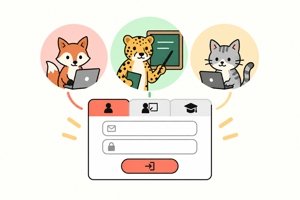
Touch typing progress in all types of exercises, including course lessons, texts, games and tests, is now saved for all student accounts. Teachers still have full control over student accounts, including the option to delete them.
In the teacher area, teachers can set the class accuracy method, minimum accuracy and speed unit (words or characters per minute), or let students choose each setting. These settings also apply when students practise typing on their own. Teachers still set the minimum accuracy separately for each in-class assignment and homework task.
There are now two ways to calculate typing accuracy. With first-try accuracy, typos count even after correction, but correcting them reduces the penalty. With final-text accuracy, only errors left at the end of an exercise count.
New accuracy chart, retro theme and more...
AgileFingers now gives you a clearer view of your typing accuracy. Every result is now saved, and the new accuracy chart shows recent attempts, including scores below your minimum accuracy setting (90% is the default).
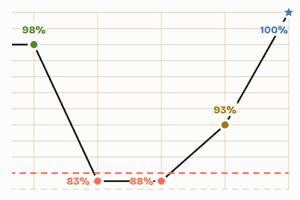
Low-accuracy results stay off the typing speed chart but remain on the accuracy chart. In score lists, an inaccurate result icon replaces the speed-level animal for such an attempt.
Accuracy is stricter too: a typo lowers your score even after you erase it with Backspace, rewarding correct typing on the first try. New small icons above the text show the status of each typo correction during typing.
There is also a calm, lower-contrast retro theme. You can enable it in settings, and it can switch automatically to the dark theme for comfortable touch typing practice.
A fresh new look for AgileFingers
AgileFingers has a fresh new look that makes touch typing practice simpler and friendlier. The colors are cheerful, and the layout is clear and modern. AgileFingers is simpler and more intuitive, but advanced typing settings are still available.
The virtual hands and keyboard were redrawn from scratch. More realistic hands show beginners which finger to use and help build correct typing habits.
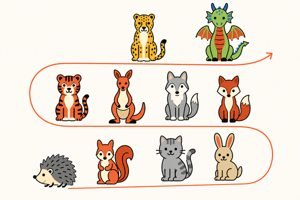
Finish any typing exercise, whether it is a text or a touch typing lesson, and an animal now shows your typing speed level.
The updated typing speed test has two exercises without virtual-keyboard hints. Along with your result, you will see an animal symbolizing your typing speed.
The module for schools is more user-friendly.
You can still type long texts, explore detailed statistics, and use the dark theme or let AgileFingers switch automatically between light and dark based on your system settings.
Frequently Asked Questions
What is touch typing?
Touch typing is a typing method where you use all ten fingers and keep your eyes on the screen instead of looking for keys.
What is the best way to start on AgileFingers?
Start with the main typing exercise button. It lets you type right away and helps you decide whether to continue with the course, full texts, games, or a typing test.
Is AgileFingers free?
Yes. AgileFingers offers a free typing course, text practice, typing games, and typing tests.
Can teachers use AgileFingers at school?
Yes. Sign in as a teacher to create classes, add student accounts, assign typing tasks, and follow student progress.
How often should students practice typing?
Try short, regular sessions. Start with 10 to 15 minutes and take a break when your concentration or accuracy drops.